

Read the number on the display, note the units, and confirm calibration.
If you want steady air, healthy rooms, and happy gear, you need to know how to read a hygrometer. I have used these in homes, humidors, greenhouses, and server rooms. In this guide, I will show you how to read a hygrometer with simple steps, pro tips, and real examples that save time and money.

What a hygrometer measures and why it matters
A hygrometer measures relative humidity, or RH. That is the amount of water vapor in the air compared to the maximum it could hold at that temperature. Warm air can hold more water than cold air.
Most homes feel best between 30% and 50% RH. Too low can cause dry skin and cracked wood. Too high can lead to mold and dust mites.
Some models also show temperature and dew point. Dew point is the temperature where air becomes saturated and water condenses. It helps you spot risk for fogged windows and mold.

Types of hygrometers and what you will see on each
Analog (dial) hygrometer
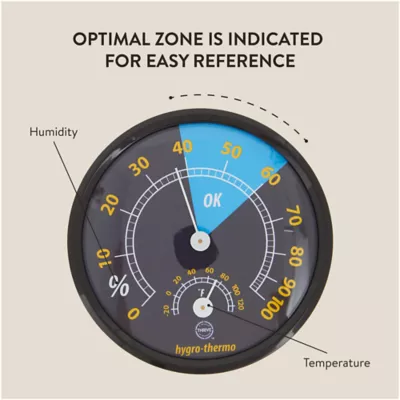
A dial model has a round face with a needle. The scale shows 0% to 100% RH. Some have a small screw on the back for calibration. They look classic and need no batteries.
Digital hygrometer
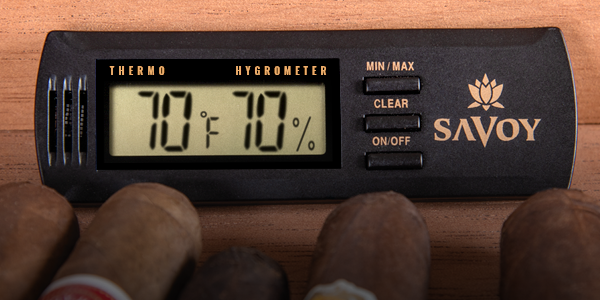
A digital model shows RH as big numbers. It may also show temperature, dew point, and trend arrows. Many can store min and max values, and switch between Celsius and Fahrenheit.
Smart hygrometer
A smart model pairs with an app. You get graphs, alerts, and remote checks. They are great for greenhouses, wine cellars, and data logging.

Step-by-step: how to read a hygrometer
If you want a clear, repeatable method, use these steps. This is the core of how to read a hygrometer in any space.
- Place it right. Keep it away from vents, windows, and direct sun. Put it about chest height where air can move.
- Let it settle. Wait 15 to 30 minutes after moving it. Sensors need time to adjust.
- Read the RH value. This is the main number. It shows how damp or dry the air is.
- Check units and extras. Note Fahrenheit or Celsius. If shown, note dew point, trend arrows, and min or max.
- Confirm the range you want. For homes, aim for 30% to 50% RH. For cigars, aim near 65% to 72% RH.
- Record or act. Log the value if you track changes. Use a humidifier, dehumidifier, or vents if needed.
- Recheck later. RH can swing with weather, cooking, or showers. Watch patterns over time.
When I teach new techs how to read a hygrometer, I always say: slow down, place it well, and wait. Rushing leads to bad calls and wasted fixes.
Reading an analog hygrometer correctly
A dial needle is like a tiny compass. Read it at eye level to avoid parallax error. Do not tilt the face while reading.
- Find the tick marks. Many dials mark every 1% or 2% RH, with numbers at 10% steps.
- Estimate between ticks. If the needle sits between 40 and 50, judge the midpoint.
- Expect some error. Many dials are accurate to about ±5% RH unless well calibrated.
- Use the adjuster if you have one. There is often a screw on the back for fine tuning.
Example: Your needle points halfway between 45 and 50. Call it 47% to 48% RH. Note the room temperature too, if the device shows it.
This is a simple, reliable way for how to read a hygrometer with a dial in a humidor or studio.

Reading a digital hygrometer like a pro
Digital screens are easy to read. The largest number is the current RH. Most models show temperature next to it.
- Look for units. Note if it shows Fahrenheit or Celsius.
- Check trend arrows. An up arrow means humidity is rising. A down arrow means falling.
- Use min and max memory. Clear it once a day or week to track swings.
- Dew point helps you plan. If dew point is close to room temperature, you may get condensation.
This simple routine is the fastest way for how to read a hygrometer on a digital screen and make a smart choice fast.

Calibration, accuracy, and the salt test
Your skill in how to read a hygrometer only helps if the device is accurate. A field check is easy with the salt test.
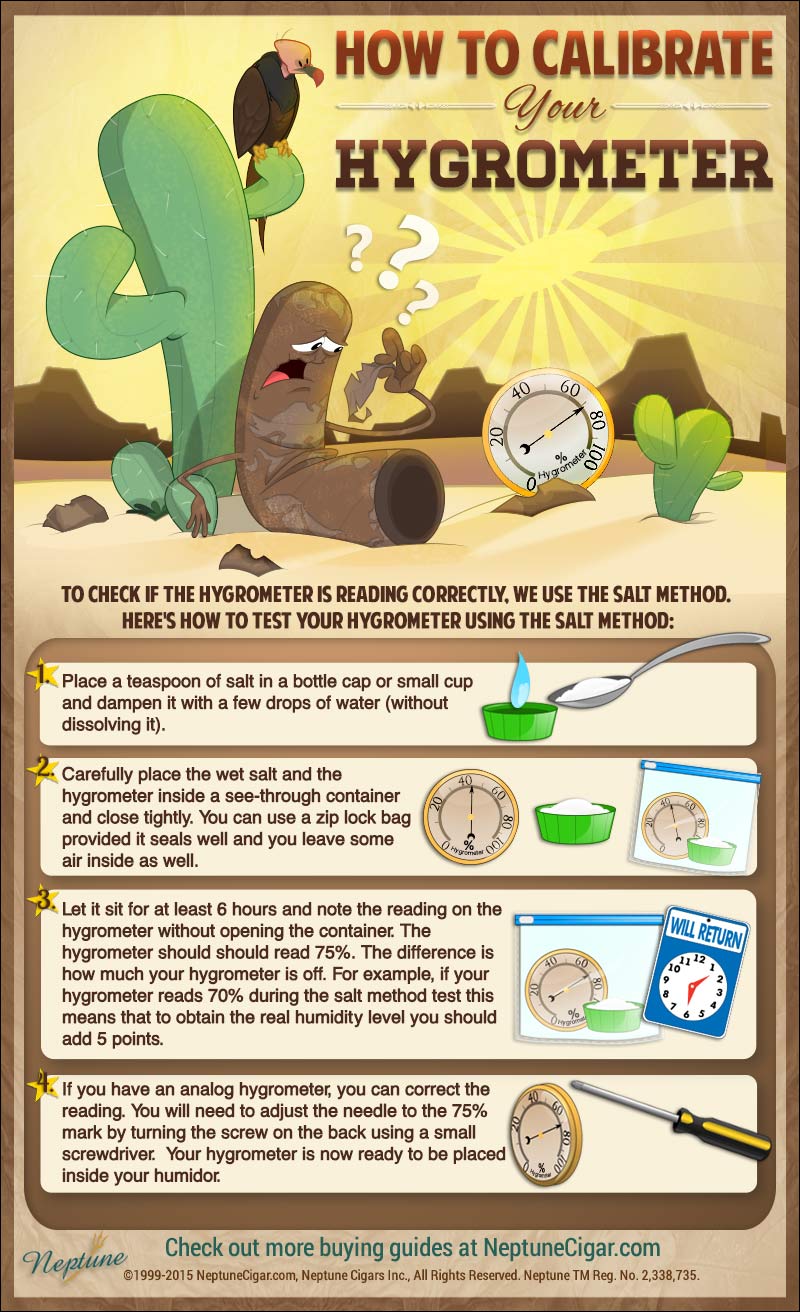
- Place a bottle cap of table salt in a small cup. Add a few drops of water to form a wet paste.
- Put the cup and your hygrometer in a sealed bag or box. Keep it at room temperature.
- Wait 8 to 12 hours. The air in the bag should reach about 75% RH.
- Read your device. If it shows 70%, it is 5% low. If it shows 80%, it is 5% high.
- Adjust if possible. Turn the screw on an analog model to match 75%. For digital, note the offset or adjust in the app if allowed.
Most home units are rated between ±2% and ±5% RH. Temperature swings and aging can shift readings. For critical work, repeat the test or use two salts for two points. Cross-check with a known good meter each season.
Placement and best practices for stable readings
Knowing how to read a hygrometer starts with where you put it. Bad placement makes any number lie.
- Avoid drafts. Keep it away from AC vents, heaters, and fans.
- Avoid hot spots. Do not place in sun or near appliances.
- Avoid exterior walls in winter. Cold walls can skew readings.
- Aim for breathing height. Three to five feet off the floor works well.
- Give it time. Let it sit 15 to 30 minutes when moved.
In my greenhouse, a sensor near the door jumped 15% with each opening. Moving it 4 feet inside fixed the false swings fast.
Interpreting readings for home, health, and hobbies
Once you know how to read a hygrometer, use the numbers to make better choices. Target ranges vary by use.
- Homes and apartments: 30% to 50% RH. Cooler seasons can be 30% to 40% to limit window fog.
- Bedrooms and baby rooms: 40% to 50% RH for comfort and fewer nosebleeds.
- Wood floors and guitars: 40% to 55% RH to prevent cracks or swelling.
- Cigar humidors: 65% to 72% RH, depending on origin and taste.
- Greenhouses: 50% to 70% RH for many plants. Vent if mildew shows.
- Server rooms and labs: 40% to 60% RH common in industry guidance.
- Museums and archives: often 45% to 55% RH with tight control.
If RH is too high, use a dehumidifier, turn on AC, improve venting, or add heat to raise dew point margins. If RH is too low, use a humidifier, add houseplants, or place water trays near heating sources. Fix leaks and seal drafts to cut swings.

Troubleshooting and common mistakes
Even if you know how to read a hygrometer, small errors can creep in. Here is what to watch.
- Battery low: Digital screens may drift or dim. Replace batteries first.
- Sensor not acclimated: Readings can lag by 10 to 20 minutes after a move.
- Stuck needle: Tap the face of a dial gently if it sticks.
- Dirty or wet sensor: Wipe dust. Let it dry fully if it got splashed.
- Big room gradients: Kitchens and showers create local spikes. Use more than one sensor for a true picture.
I once chased “high humidity” in a studio for days. The hygrometer sat above a humidifier outlet. Moving it two feet solved the “mystery.”
Quick reference: how to read a hygrometer in special cases
- Cold garages or basements: Check dew point. If room temperature is near dew point, plan heat or dehumidification to avoid rust.
- Saunas and steam rooms: Use high-range devices. Standard sensors can saturate and read wrong.
- Outdoors: Shield from sun and rain. Use a ventilated screen for fair readings.
- HVAC vents: Do not read right at the grille. Step back a few feet for mixed air.
- Travel humidors or cases: Let the meter rest 30 minutes after opening to avoid shock readings.
These fast checks help you apply how to read a hygrometer in tricky spots without guesswork.
Frequently Asked Questions of how to read a hygrometer
How do I read a hygrometer in simple steps?
Place it well, wait 15 minutes, and read the RH number. Note units, temperature, and any trend arrows, then act if outside your target range.
What is a good indoor humidity level?
Most homes feel best between 30% and 50% RH. Aim near 40% to 45% in winter to limit window fog, and nearer 45% to 50% in summer.
How often should I calibrate my hygrometer?
Check it every 3 to 6 months, or after a big drop or spike in readings. Use the salt test or compare with a trusted meter.
Why does my hygrometer change so much during the day?
Cooking, showers, and weather shifts can move RH quickly. Placement near vents or windows can also cause swings.
Analog vs digital: which is more accurate?
Quality digital sensors tend to hold accuracy better and are easier to read. A well-made, calibrated analog can be very good, but it needs regular checks.
What is dew point and why does it matter?
Dew point is the temperature where air becomes saturated and water condenses. It helps you predict fogged windows, rust risk, and mold growth.
Conclusion
You now know how to read a hygrometer with confidence. Place it right, let it settle, read RH and key extras, and check calibration on a set schedule. Small habits bring steady air, safer gear, and fewer surprises.
Put one sensor in your most-used room today. Log readings for a week and make one change. If this helped, subscribe for more simple home and pro tips, or drop your questions in the comments.